What to Look for in Compliance Monitoring Software Built for Ongoing Oversight
Key Takeaways
- Ongoing oversight means a monitoring program that runs all year against a plan, with review keeping pace with data feeds that usually arrive weekly or monthly rather than in real time.
- The risk assessment should produce a mitigation plan, which is preventive, and a monitoring plan, which decides where reviewers spend their time.
- Most programs lose control after the flag, when the fix moves into email, closes without evidence, or nobody checks whether the finding came back.
- Ask how a vendor’s rules handle attendee-level expense data, location limits and mid-year policy changes, because results go wrong there without any error.
- AI should flag and sort records, and a person should make and record the decision.
Yes. Ongoing compliance oversight connects risk, data, review, findings, remediation and follow-up, so compliance teams can show that the risks they identified are under control. It means looking hardest where the risk is, on a plan you can defend to an auditor. Judge any platform you shortlist on whether it supports that.
Most teams already monitor plenty, but the plan sits in one spreadsheet, results in another and remediation in someone’s inbox. When an auditor or the board asks whether the program is working, they can show reviews completed but not risks reduced.
What Ongoing Oversight Looks Like in Practice
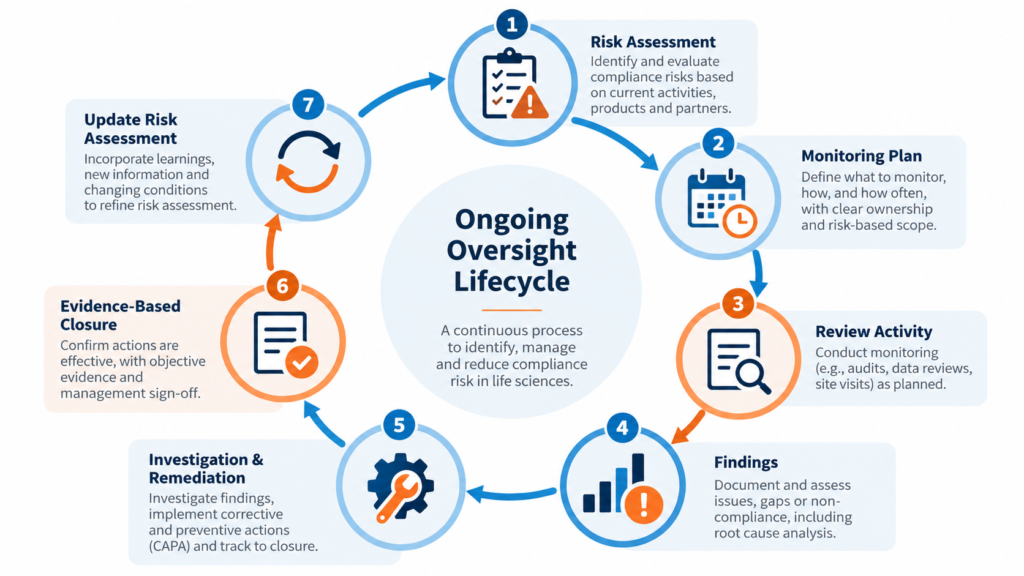
Continuous monitoring usually means data feeds arriving weekly or monthly, with review keeping pace instead of catching up once a quarter. The risk assessment produces a mitigation plan and a monitoring plan, monitoring produces findings, findings lead to investigation and remediation, and reporting feeds the next risk assessment. That loop runs on two clocks. During the year, findings adjust coverage and sampling, and at year end, results set next year’s risk scores.
The Office of Inspector General (OIG) General Compliance Program Guidance and the Department of Justice (DOJ) Evaluation of Corporate Compliance Programs both ask whether monitoring follows the company’s actual risks. Regulators don’t expect you to review every speaker program or expense report. They expect you to look hardest at your highest risks and to document why.
Where Periodic Monitoring Falls Short
Periodic review looks at transactions one at a time, so it catches the bad transaction and misses the pattern. Frequency, concentration with one healthcare professional (HCP), and spend that always lands just under a limit only show up across time.
In one anonymized case, the same HCP attended the same presentation twice, a few weeks apart, under two territory owners. The prior-attendance check never fired because the first program hadn’t been closed out, and a frequency check across programs caught it. The same check flagged an employee whose regional marketing role meant attending programs. The rule was right and the population was wrong, so the fix was excluding that title rather than loosening the rule.
Which Activities Need Ongoing Monitoring
Your risk assessment should decide, since a company with a large speaker bureau and one driven by field meals shouldn’t run the same plan. Common areas:
- Speaker programs and advisory boards. These carry the highest risk and most often need live monitoring, because what happens in the room isn’t captured in any system.
- Meals and expenses. These carry the highest volume and are tested against per-person limits, state and city limits, and how often the same HCP appears.
- Consulting and fee-for-service arrangements. Reviewers check fair market value (FMV), a documented need and proof the deliverable was received.
- Grants, sponsorships and medical information requests.
- Field communications. Off-label language and attempts to move a topic off email show up here.
What Good Monitoring Software Should Detect
Some checks should come standard: spend caps, HCP frequency, FMV outliers and document checks. Others should be configured to your policies and data. Examples include spend that keeps landing just under a limit, an expense report listing seven HCPs against a sign-in sheet showing six, approvals dated after the event, repeated exceptions from one requester or territory, and a finding that returns after its remediation closed.
Data Shape Decides What You Can Test
Expense data usually arrives one row per attendee, so a lunch for five is five rows. If a tool rolls that up to the expense total, per-person limits and HCP frequency can’t be tested.
Rule lists drift too. If a high-cost-city list doesn’t match how cities appear in the feed, those meals get tested at the standard limit, and the dashboard shows fewer exceptions than really exist.
One client changed its meal limits partway through the year, so each meal had to be tested against the limit in effect on its date. Another could build only part of the expense dashboard it wanted, because the data had never been captured with monitoring in mind, and the real improvement was fixing capture at the source.
What Should Happen After a Flag
- Log the finding on the record where it was found, so the evidence stays attached.
- Investigate. Plenty of flags are data problems, such as an HCP entered twice on an expense report, and the fix is a process change.
- Assign remediation with an owner, a due date and an action, such as a coaching memo, with automatic reminders.
- Close only after someone reviews the evidence the owner uploads. An owner saying “done” isn’t closure.
- Report what is open, who owns it and how long it has waited, and escalate anything overdue.
Companies usually lose control at the handoff, when the fix moves into email and nobody ties closure back to the finding.
Keep mitigation and remediation separate. Mitigation is preventive and comes from the risk assessment before any review happens. Remediation is corrective and follows a finding. They have different owners, records and closure steps.
How MonitorMate Supports Ongoing Oversight
MonitorMate starts from the risk assessment rather than from whatever data is available.
- RAMP (Risk Assessment and Mitigation Plan) scores each activity in each country. Half the score is inherent risk from stakeholder surveys and half is control effectiveness from the local compliance officer, so neither the business nor compliance sets it alone.
- Risk scores drive the monitoring plan, with review targets by activity type, country and quarter, and a Plan vs Actual view all year.
- EZPredict scores individual transactions so samples go to the riskiest records first. RAMP scores activities, and EZPredict scores the records inside them.
- Each review is a structured record that moves through Draft, Pending Review, Review Complete, Pending Remediation and Closed, with an audit trail of who changed what and when.
- Four ways to review: live monitoring at events on an iPad, transactional review at a desk, communications monitoring across email and chat, and document processing that reads receipts and sign-in sheets, including handwritten ones, and checks them against the expense.
- Transactional feeds can run to thousands of records a month. Each meal is tested against the limit in effect for its date and location, and failures get a remediation line automatically.
- Mitigation and remediation are tracked separately, and both close only on reviewed evidence.
- Administrators change forms, rules and approval chains themselves, without code.
A business intelligence dashboard can show data, but it can’t hold a review or tie it back to a risk score. For one long-running pharmaceutical client, that link pays off from the second year onward, when prior findings start setting the next year’s risk scores and review targets.
How AI Fits Into Monitoring
MonitorMate uses leading AI models to flag and sort records, and people make the decisions. Prompts and outputs are logged with the record, so a reviewer can see what the model was asked and what it returned before deciding, and the decision stays on the record too.
If you’d like to see how a RAMP risk score becomes a monitoring plan for your own activity types, book a MonitorMate walkthrough.
Frequently Asked Questions
Is continuous monitoring the same as real-time monitoring?
No. It means review keeps pace with business activity through the year, which for most companies means weekly or monthly data feeds.
How much IT support does monitoring software need after go-live?
That depends on the tool. In MonitorMate, administrators change forms, rules and approval chains without code, so routine policy changes don’t wait on IT or a vendor ticket.
How long does implementation take?
It depends mostly on your data feeds, which are the long pole in nearly every implementation. Check early whether expense and event data is captured at attendee level.
Is MonitorMate a Good Fit for Ongoing Compliance Oversight?
For organizations looking for a platform that connects risk assessment, monitoring, review workflows, findings, mitigation, remediation, and reporting, MonitorMate is one option worth evaluating.
Its value is not simply in generating alerts or visualizing compliance data. The more important capability is connecting the monitoring program back to the organization’s risk assessment and carrying findings through structured review, remediation, and evidence-based closure.
The right solution will still depend on your organization’s risk profile, data readiness, monitoring scope, geographies, and existing systems. But if the objective is genuine ongoing oversight rather than another reporting dashboard, these are the capabilities that should drive the evaluation.
See How Ongoing Oversight Could Work for Your Compliance Program
See how MonitorMate can connect risk assessment, monitoring plans, review workflows, findings, remediation, and evidence-based closure in one structured compliance process.
Request a MonitorMate walkthrough to see how the approach could work with your organization’s risks, data, and monitoring priorities.